
Ever wondered if your iPhone is JV or factory unlocked? You’re not alone! So we will provide you with 3 Proven Methods how to fix this problem. Let’s dive into the world of iPhones and unlock the mystery together, shall we?
Understanding iPhone Unlock Status
First things first, knowing whether your iPhone is JV or factory unlocked is crucial for a variety of reasons. A factory-unlocked iPhone offers the freedom to switch between carriers without a hitch, making it a preferred choice for many. On the other hand, a JV iPhone has been unlocked using third-party software or hardware, which might not be as reliable.
The Benefits of a Factory-Unlocked iPhone
- Enjoy hassle-free international travel with a factory-unlocked iPhone.
- Seamlessly switch to a carrier with a better plan whenever you desire.
- Factory-unlocked iPhones offer unparalleled flexibility, adapting to any network instantly.
- These devices are the ultimate globetrotters in the smartphone world, always ready for new adventures.
How to check whether iPhone is JV or Factory Unlocked
Via Settings
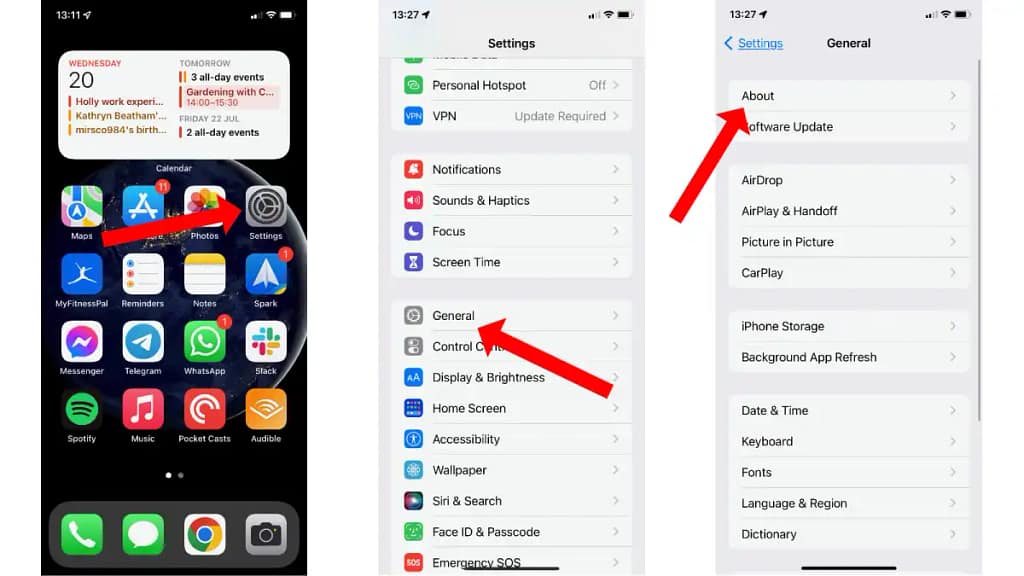
The simplest way to check your iPhone’s unlock status is through the Settings app:
- Open Settings > General > About.
- Scroll down to find Carrier Lock or Network Provider Lock.
- If it says No SIM restrictions, congratulations, your iPhone is factory unlocked!
Using a SIM Card

For iPhones older than the iPhone 13, you can also check the unlock status by using a SIM card from a different carrier:
- Power off your iPhone.
- Use a SIM card ejector tool to open the SIM tray and insert the new SIM card.
- Power on your iPhone.
- If you receive a message indicating the SIM card is not supported, your iPhone is likely locked to a specific carrier.
IMEI Checkers

Another reliable method is using an online IMEI checker. Here’s how:
- Dial *#06# to find your iPhone’s IMEI number or go to Settings > General > About.
- Visit a reputable IMEI checker website like https://www.imei.info/ and enter your IMEI number.
- The website will provide detailed information about your iPhone, including its unlock status.
People also ask
What is a JV iPhone?
A JV iPhone has been unlocked using a hardware chip like Gevey SIM or through software, allowing it to be used with different carriers. However, it might not support all carrier features.
How can I unlock my iPhone if it’s locked to a carrier?
Contact your carrier to request an unlock. This process might take a few days, and requirements vary between carriers.
Are there any risks to using a JV iPhone?
While JV iPhones offer the benefit of being cheaper, they may not support all carrier features and could potentially face issues with future iOS updates.
Can I check my iPhone’s unlock status without a SIM card?
Yes, you can use the Settings method or an online IMEI checker to check your iPhone’s unlock status without needing a SIM card.
Will a factory reset affect my iPhone’s unlock status?
No, a factory reset will not change whether your iPhone is JV or factory unlocked. The unlock status is tied to the device’s hardware or software modifications, not the user data.
Can a JV iPhone be reverted to a carrier-locked status?
It’s unlikely, but software updates or restoring the device without the unlocking chip could potentially re-lock it to the original carrier.
Is it legal to use a JV iPhone?
The legality of using a JV iPhone can vary by country and the method used to unlock it. Always check local laws and regulations.
Final Words
It’s crucial to know how to determine whether your iPhone is factory unlocked or just a JV device, particularly if you intend to buy a used phone or transfer networks. Making educated selections and quickly ascertaining your iPhone’s unlock status is possible if you use the preceding steps. Recall that a factory-unlocked iPhone is thought to be a safer investment and provides the greatest flexibility. Determining your iPhone’s unlock status is a first step towards realizing its full potential, regardless of whether you’re a tech geek or just trying to learn more about its capabilities. Cheers to your exploration!

