
Table of Contents
Telegram is gaining popularity in Pakistan for secure messaging. This guide covers how to Use Telegram in Pakistan 2024, key features like chats, groups and channels, customization options, best practices for safe usage and tips to easily navigate Telegram in Pakistan.
Using Telegram in Pakistan is becoming increasingly popular due to the app’s focus on speed, security and privacy. Telegram boasts enhanced encryption protocols to keep chats, media and files safe. It also offers helpful features like groups, channels, bots and stickers.
This step by step guide will teach you how to Use Telegram in Pakistan 2024 for messaging friends, following channels or building communities.
What is Telegram?

Telegram is a free cloud-based instant messaging app launched in 2013 by Russian brothers Nikolai and Pavel Durov. It quickly gained popularity as a secure alternative to WhatsApp by prioritizing encryption and user privacy.
Some key facts about Telegram:
- End-to-end encrypted chats, calls and media sharing
- Syncs seamlessly across mobile, desktop and web apps
- Options for secure secret chats with auto deleting messages
- Supports group chats for up to 200,000 members
- Has public channels, bots, stickers and GIFs
- Allows users to store files and media in the cloud
- Can access your messages from multiple linked devices
- Offers user-friendly interface and apps for all platforms
As of 2022, Telegram has over 700 million active users globally, with large user bases in Asia, Eastern Europe and the Middle East. It is now one of the top 10 most downloaded apps worldwide.
Downloading Telegram in Pakistan
Downloading Telegram on your mobile device or desktop is quick and easy in Pakistan.
On your phone, open the Google Play Store or Apple App Store and search for “Telegram Messenger”. Download and install the official Telegram app for free.
On your PC, go to the Telegram website desktop app page and download the installer. Run the installer and follow prompts to setup Telegram on your Windows, Mac or Linux computer.
On the web, you can directly access Telegram by going to web.telegram.org and scanning a QR code with your phone app. This will sync your chats to the web version.
Here are direct download links to get Telegram in Pakistan on all platforms:
- Android App
- iOS App
- Desktop App
- Web App
The apps are very small in size and quick to install. Signing up is also fast and hassle-free.
How to Create a Telegram Account?
Creating a new Telegram account takes just a few minutes. Follow these steps:
Step 1: Enter Your Phone Number
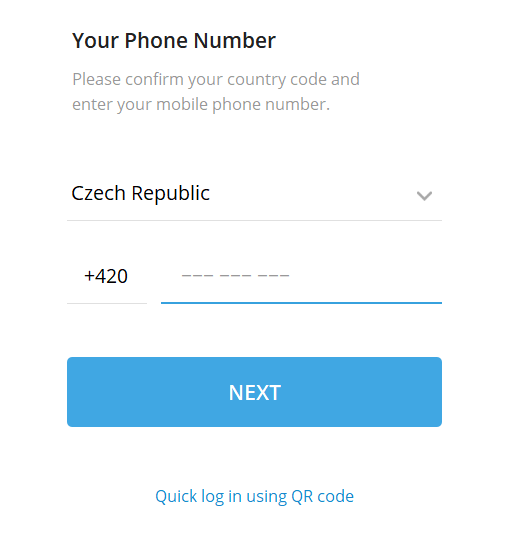
When first opening Telegram, you will be prompted to enter your phone number including country code. This will be your account’s main identity.
Numbers are not publicly visible but used for account creation. You can also login on additional devices later using this number.
Step 2: Verify Your Number

Telegram will send a confirmation code via SMS to verify your number. This ensures only you can access the account.
Enter the 5-6 digit code received in the app. Telegram may ask you to manually enter a code it shows just to confirm you are not a robot.
Step 3: Set a Username
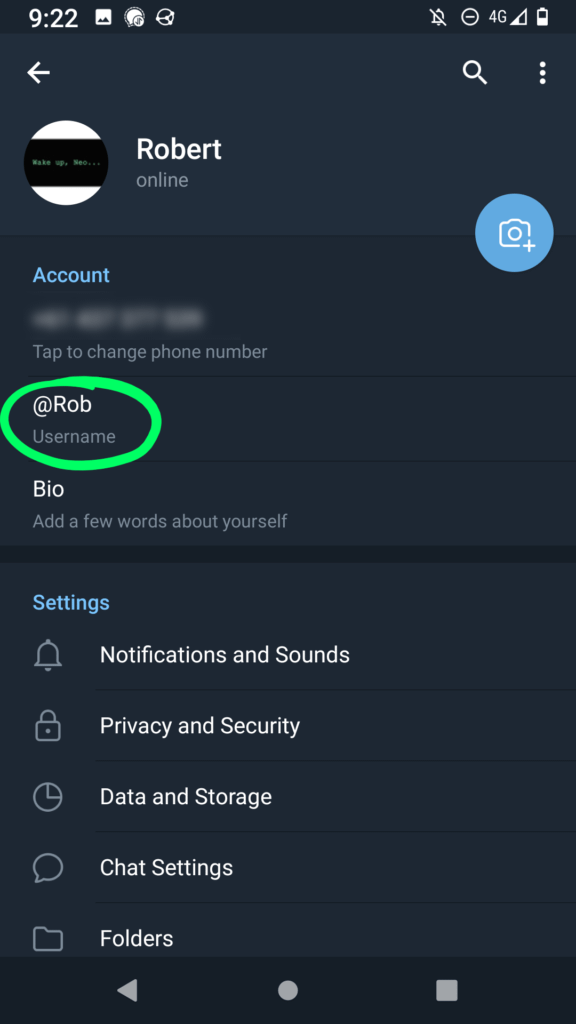
You can now optionally set a public username like @john_doe. Usernames are visible to any Telegram users who add or message you.
A username makes it easy to find people on Telegram without sharing private phone numbers. You can change it later.
Step 4: Add Profile Photo and Bio
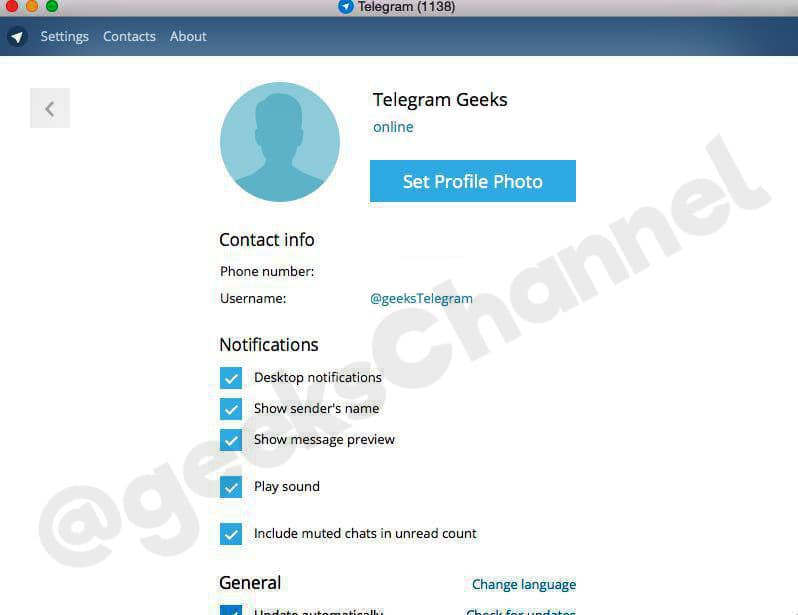
Add a profile photo and fill your bio if you wish. Profile photos are public while the bio is visible only to your contacts on Telegram.
With this, your Telegram account is set up! The sign up process is very quick and you can start using Telegram immediately.
Read also: Why We Don’t See Budget-Friendly Laptops Nowadays
How to Use Telegram – Key Features
Telegram offers a wide array of messaging features. Here are some of the most useful aspects for users in Pakistan:
Chats
One on one chats are the basic way to privately message your contacts on Telegram. You can share text, media, documents and create polls in chats. Chats also support voice notes, video and audio calls.
Groups
Groups allow you to communicate with up to 200,000 members together. Join groups to meet people, collaborate on projects or get updates from businesses. Any group member can post messages, files and media to the entire group.
Channels
Channels let you broadcast messages to an unlimited number of subscribers. Individuals and businesses use channels to share updates, articles, promotions with large audiences. Only admins can post in channels while members can view and forward posts.
Bots
Bots are automated accounts you can interact with in Telegram chats. Useful bots provide services like news updates, weather reports, language translation, music downloads and more. Bots add a lot of utility to the Telegram experience.
Stickers and GIFs
Telegram has a huge collection of illustrated stickers and animated GIFs you can share in chats and groups. Stickers help express emotions and reactions during conversations. Use GIFs to liven up your chats and make them more fun.
Media Sharing
Easily share photos, videos, documents and other media directly in Telegram chats. Media can be up to 2GB in size per file. The app also supports streaming for sharing large videos. Media can be saved in the cloud on Telegram’s servers.
Secret Chats
For extra security, you can enable end-to-end encrypted Secret Chats with contacts. Messages in secret chats can self-destruct with a timer. Read receipts, forwarding and screenshot notifications provide privacy.
These handy features make Telegram a versatile platform for both private and public communication in Pakistan.
Can we use telegram in pakistan without vpn?
You can use Telegram in Pakistan without needing a VPN by setting up a Telegram proxy. Think of a proxy like a secret tunnel that connects your phone to Telegram through another country. This way, it looks like you’re using Telegram from somewhere else, not Pakistan. Here’s how you can do it:
- Install the Telegram app on your mobile phone and open it.
- Log in to your Telegram account using your phone number.
- Click on the Hamburger menu and go to “Settings”.
- In the settings menu, select “Data and Storage”.
- Here, scroll down and tap on the “Proxy Settings”.
- In the proxy settings, click on “Add Proxy”.
- Enter the IP address and port number of the proxy server you want to use.
- Click on “Check Proxy” to test the connection.
- If the Telegram proxy is working correctly, you will see a message saying “Connection is successful.”
- You can now use Telegram in Pakistan without VPN.
Customizing Your Telegram Experience
Telegram is highly customizable to each user’s preferences. Tweak these settings for the best experience:
Language and Theme
Change Telegram’s default language to Urdu, English or any other language you prefer. Pick from dozens of colorful themes to suit your style. Dark mode can be enabled for comfortable nighttime use.
Notifications
Configure notification settings and tones for new messages, groups and channels. Enable or disable notifications from specific chats. Silence notifications when sleeping or studying to avoid distractions.
Privacy Controls
Choose who can see your number, profile photo, forwards, online status and more. Set chat privacy so only contacts can message you. Restrict groups, channels and bots if unwanted spam is an issue.
Data Storage
Have Telegram store media in the cloud rather than your phone’s limited storage. Enable auto-download of media for wifi only to save mobile data. Clear cached data regularly to free up space.
Security
Set up two-step verification by password or app authentication codes for extra login security. Change privacy settings to control forwarding, screenshots and visibility.
By tailoring Telegram to your needs, you can streamline your messaging experience.
Best Telegram Practices in Pakistan
Here are some tips to safely enjoy Telegram in Pakistan:
- Don’t share your number publicly to avoid spam risks
- Be wary of shady groups and channels pushing illegal content
- Enable Two-Step Verification for account security
- Frequently change your privacy settings if needed
- Don’t click suspicious links sent in messages
- Avoid downloading media from unknown contacts
- Set auto media download to wifi only to manage mobile data
- Report spam bots, fake accounts and offensive posts
- Create a channel to share knowledge rather than just consume it
Following best practices will help you have the best Telegram experience where you control your privacy and safety.
Final Words
Telegram offers the speed and convenience of instant messaging with the privacy and security features needed by users in Pakistan. With its versatile chatting options, media sharing, cloud storage and focus on encryption it is an ideal communication app.
This guide covers the basics of setting up a Telegram account, key features to use and customization options to try out. Follow the tips to safely navigate Telegram. With its multi-platform accessibility and ease of use, Telegram can become your messaging app of choice in Pakistan.

